9. Drawing
In this chapter you will learn to draw points, lines, circles and arcs
with PLOT, DRAW and CIRCLE, and filled shapes with BOX, DISC and
POLY.
Pixels and coordinates
The screen is made of tiny dots called pixels: 256 across and 192 down
in mode 0. To draw, you say which pixel with two numbers, its
coordinates: x (how far to the right) and y.
For PLOT, DRAW and CIRCLE, the point (0,0) is the bottom left
corner, and y grows upwards, as in maths class. x goes from 0 to 255 and
y from 0 to 175 (the bottom two rows of characters are kept for messages).
PLOT, DRAW and CIRCLE
PLOT x,ylights the pixel at (x,y).DRAW dx,dydraws a line from the last point to a pointdxpixels to the right anddypixels up. The numbers are relative: they say how far to move, not where to go. Negative numbers go left or down.CIRCLE x,y,rdraws a circle with its centre at (x,y) and radiusr.
10 PLOT 0,0
20 PLOT 255,175
30 PLOT 128,88
40 PLOT 20,150: DRAW 100,0: DRAW 0,-50: DRAW -100,50
50 CIRCLE 200,60,30
Lines 10 to 30 light three pixels: two corners and the middle. Line 40 draws a triangle: from (20,150), 100 to the right, 50 down, and back to the start.
You can give a colour to each drawing, as with PRINT:
10 BORDER 0: PAPER 0: CLS
20 FOR i=1 TO 7
30 CIRCLE INK i;128,88,i*12
40 NEXT i
10 PAPER 0: CLS
20 FOR x=0 TO 255 STEP 8
30 PLOT INK 6;x,0: DRAW INK 4;255-x,175
40 NEXT x
Arcs
DRAW with a third number draws an arc instead of a straight line. The
number is how much it turns, in radians: PI is half a turn. Positive
numbers bend one way and negative ones the other:
10 PLOT 50,100: DRAW 150,0,PI
20 PLOT 50,120: DRAW 150,0,-PI/2
Curves with maths
SIN gives the height of a wave. Plot one point for each x and you get a
curve:
10 FOR x=0 TO 255
20 PLOT x,88+60*SIN (x/128*2*PI)
30 NEXT x
Filled shapes: BOX, DISC and POLY
ZX-V adds commands that draw filled shapes, very fast. They are part of the graphics for games that you will use in chapter 12, and they work a bit differently:
- The colour comes first, as a number from 0 to 15: 0 to 7 are the normal colours and 8 to 15 their bright versions (10 is bright red, 14 bright yellow).
- The coordinates start at the top left corner and
ygrows downwards, like the rows ofPRINT AT.ygoes from 0 to 191.
| Command | Draws |
|---|---|
BOX c,x,y,w,h |
A filled rectangle with its top left corner at (x,y), w wide and h high |
DISC c,x,y,r |
A filled circle with its centre at (x,y) and radius r |
POLY c,x1,y1,x2,y2,x3,y3... |
A filled polygon with those corners (up to 64) |
This program shows the difference between the two ways of counting y:
10 PAPER 0: CLS
20 PLOT INK 7;10,10: DRAW INK 7;235,0
30 BOX 2,10,10,40,30
40 PRINT AT 21,0; INK 7;"BOX at 10,10"
The line from PLOT 10,10 is near the bottom; the red box at 10,10 is at the
top.
With a few filled shapes you can paint a whole picture:
10 BORDER 5: PAPER 5: CLS
20 REM sky and grass
30 BOX 13,0,0,256,120
40 BOX 4,0,120,256,56
50 REM the sun
60 DISC 14,210,30,18
70 REM the house
80 BOX 7,60,70,90,60
90 POLY 2,50,70,105,30,160,70
100 BOX 1,95,95,22,35
110 BOX 6,70,80,18,16: BOX 6,125,80,18,16
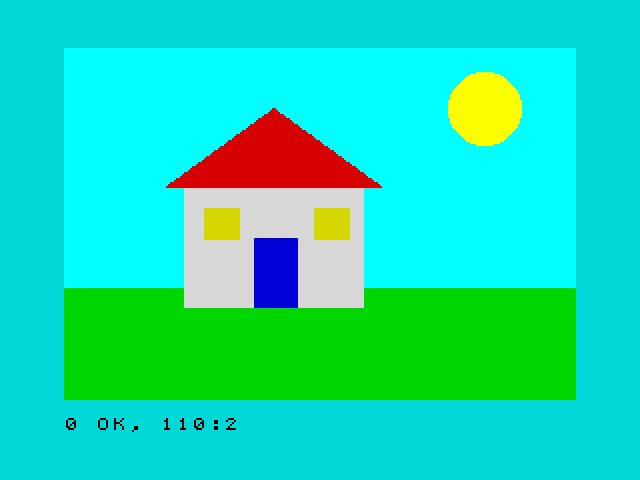
The roof is a POLY with three corners: the two ends of the eaves and the
top. Shapes drawn later go on top of earlier ones, so the windows and the
door are drawn after the wall.
Try it
- Draw a target: five filled circles, one inside the other, alternating red and white.
- Add a tree to the house picture: there is no brown among the standard
colours, so use a yellow
BOXfor the trunk and a greenDISCfor the leaves. (WithPALETTEyou could make a brown.)
Hint
For the target, draw the biggest circle first, with a FOR loop that goes
down in size: FOR i=5 TO 1 STEP -1. The colour can be worked out from i:
red (2) when i is odd and white (7) when it is even.
A solution for the first one
10 PAPER 0: CLS
20 FOR i=5 TO 1 STEP -1
30 LET c=2: IF INT (i/2)=i/2 THEN LET c=7
40 DISC c,128,88,i*15
50 NEXT i
Reference: PLOT, DRAW,
CIRCLE, BOX,
DISC, POLY,
Colours.
Next: 10. Sound and music · Previous: 8. Colours and the screen